Tuesday, April 26, 2016

UI Test Automation using Page Object Model

The toughest part in UI automation is to maintain scripts with the latest changes happening on the pages like changes in DOM. This is because of having same XPATH or CSS at multiple locations.

To solve this the first step could be moving all these elements to single constant class. But then it would be difficult when this list grows. So to categorize these elements, one can create separate class per page. 

But next hardship comes with different actions that we can perform on multiple pages. For example initially accepting Terms and Conditions is a checkbox then they have changed it to radio button. So both the XPATH and method got changed here. So one can put all these methods into the same classes that we have created per page.

So now we have one class per page which has elements of that page and actions on that page are defined. This ideology is the basis for new approach in UI Automation called Page Object Model. Its essentially same ideology which don't allow duplication of code or scattering of code.

Selenium Webdriver provides Page Object Model (POM) as a feature. It allows you to defined Page Objects and it takes care of initializing these objects using Page Factory.

For example if you have Google Home Page, the elements like Text Box, Search Box, Language Options will be elements defined as XPaths or CSS in POM and Search is an action that you can perform on the page. That will be a method in POM. 

Also when you write test cases using POM, all the UIness will be abstracted in Page Objects. So your tests can be executed against APIs if they are valid in that context.

~Yagna

Approach for Data Generation to test Big Data

There are several ways that we can test Big Data Pipelines.

1. Golden Data Set

In this approach, one will create a Data Set either by Hand or by copying it from Production. Manually expected output is determined by running the logic in Human brain. Once expected output is determined, the data set along with expected output will be called as Golden Set. 

This is a good approach to begin with. But when more number of columns gets added (Regular activity in Data Team) and they have relation with existing columns then it will become really tedious to maintain this data. Also as expected output has to be determined by running logic manually one cannot do this for a bigger data set or for complex logic which involves more columns to determine a column in the output.

In this case, one solution can be writing a parallel code to the dev code using different technological stack to determine expected output. But the biggest disadvantage of this approach is that QA need to have the knowledge of the alternative stack(huge learning curve) and QA can make the same mistake that of Dev while developing this pipeline.

2. Controlled Data Generation using contracts (Based on Use case Testing)

In this approach every input logline and output logline/Table will be defined either as a POJO(Plain Old Java Object) or will be used from existing contracts like Thrifts. A test case writer will be defining the input columns and valued and expected output columns and values in the form of CSV using logline definitions.

The generator will be padding all other columns from logline definitions by providing valid values. This gives biggest benefit in terms of extendability of the same test cases even if 100 new columns gets added. Also as Test case writer is handling one column or one relation (having multiple columns) at a time in a test case, he has to modify only those test cases which have columns that got affected due to addition of new columns. 

In normal case, all the old test cases will remain same and new test cases are added for new columns and definitions are updated with new columns. This can also work with optional columns kind of situations.

~Yagna

Wednesday, April 13, 2016

Simplify Big Data Testing through Spark library


Testing Big Data Pipelines is increasingly becoming complex. This has two factors. One is with maintaining setup and one is with defining or deriving the expected result.

Maintaining Setup
Hadoop ecosystem is growing rapidly and different teams are utilizing different components of ecosystem which suite their need. This increases number of components of Hadoop ecosystem to be maintained in Test Setup. This includes maintaining correct versions, required directories with correct ownership, local users and hdfs users, status of services. It is estimated that 60-70% of test cycle is vested on deployments and configurations.

Defining or deriving Expected Results
After setup the biggest challenge will be to figure out a substance with which the output is compared to. This substance is known as expected Result. There are different ways to do that. We will talk about 3 major variances.

  1. Golden Dataset
A predefined data set which is mostly hand woven and expected result is derived by going through the data manually.
  1. Production Dataset
This data is a subset of data copied from Production System. Expected result will be derived by running SQL, HQL or Pig Scripts that are hand written.
  1. Generated Dataset
This data is generated with variety of tools/programs with a predefined set of rules. Expected result will be derived by running the SQL, HQL or Pig Scripts that are derived by the tool/program.

Proposal
The proposed system will deal with these complexities by providing various REST Services like

  1. Infrastructure Service
This service provides APIs to deploy given set of machines with different components, configure and validate the deployments. Deploying, Configuring and Validating deployments are three independent services so that one can use them independently based on the kind of setup he has.
  1. Data Service
This service provides APIs to generate data, ingest data into HDFS with given rules. Generating data and ingesting data are two independent services so that one can use them based on their requirement.

  1. Execution Service
This service provides APIs to utilize various executors to run their Pipelines and monitor them. Again utilizing executors and monitors are independent. This service also provides APIs to retrieve performance related Metrics.
  1. Validation Service
This service provides APIs to invoke various validators based on the dataset.


Each service will use utility methods provided in a separate repository.

Utilities
Following utilities will be provided as part of this framework.

  1. SSH Utils
These will help to connect to a remote machine and execute commands on it. It also provides capabilities to transfer files from and to remote machine.
  1. Benerator Utils
These will help in generating data using Benerator tool, creating schema for HSQLDB and deriving expected results.

  1. Hadoop Utils
These will help in executing hadoop commands, copying files to and from hadoop.
  1. String Utils
These will help in dealing with all kinds of String operations.
  1. JSON Utils
These will help in dealing with JSON related complexities like getting value of a given element in a complex JSON, creation of JSON using objects.
  1. Database Utils
These will help in maintaining connection pool, connecting and executing and retrieving results from any Database using JDBC connector.
  1. lzo Utils
These will help in compressing and uncompressing files using lzop.
  1. Pig Utils
These will help in executing pig scripts, monitoring the execution.
  1. Falcon Utils
These will help in creating cluster, submitting feeds, submitting process and monitoring.
  1. Storm Utils
These will help in submitting Storm Topologies and monitoring them.
  1. Kafka Utils
These will help in start/stop/restart producer/consumer/Kafka server.
  1. Ambari Utils
These will help in deploying through Ambari blueprints, start/stop/status/restart of services and components, configuring services and components, sync configs from another cluster.
  1. RESTUtils
These will help in creating GET/POST/PUT REST requests, submit them and get results in JSON.

All utility methods should provide Java Documentation.

This framework will be provided as Hosted Service from Data QA Team. But the infrastructure to run the pipelines will not be a hosted service and should be registered with this framework while calling REST APIs.

Advantages

  1. Existing framework only works with in-memory dataset due to tight coupling of Benerator. With new design one can use any Dataset and any Validation.
  2. In the current system there is no way to test with production Dataset or Golden Dataset. With new design one can use any Dataset
  3. Current system cannot be used for Performance or Stability related testing as it works with in-memory dataset. With new design one can pump large data sets and can measure performance, stability or reliability of the platform.
  4. During a test cycle if one wants to use some operations available in the framework, he has to gather a lot of information to segregate that code and use. This will be taken care with the new design due to introduction of REST APIs.
  5. As this framework will be a Hosted Service, adaptability will be more and resistance will be less.


Implementation


Execution
mvn exec:java -Dexec.mainClass=<Fully_Qualified_Class_Name_Main_Method>
~Yagna

RestAPI Docs using apidocjs during build on Jenkins


* Installation - npm install apidoc -g


* Sample Documentation done for a Distcp(Hadoop File System) utility method is shown below


* Create a file called apidoc.json with following content

* Now in Jenkins  


* Now from the browser go to the workspace of this Project in Jenkins and see docs folder and point to index.html, you can see following icon
* Left side of the page will have 

* On Right side of the page shows actual documentation

* One can get more detailed examples at  http://apidocjs.com/

~Yagna

Tuesday, December 8, 2015

Testing in Agile Sprint using SuiTest (TestFlo)

Tim and Joe are members of an agile Team. Tim playing a developer role and Joe playing QA role. John is Scrum master. They are working in a Sprint of 2 Weeks. Let us illustrate several situations arises during a Sprint.


Tim: Hi Joe, coming for Sprint Planning meeting?
Joe: Yeah, let’s go.


Tim: Oh! Hectic meeting. But I am sure of what to deliver for this Sprint.
Joe: But tell me more about Story JTP-227.
Tim: Story on JIRA is updated with links where you can find more details. You can come back to me if you need more clarifications.
Joe: Thanks Tim.


Joe: Hi Tim. I have written Test Cases for Story JTP-227, can you review?
Tim: Sure! Where can I see Test Cases and how do I know which one is related to Story?
Joe: Test Cases are listed down under a Story in JIRA
Tim: Really!! I have never seen like that. Are they subtasks for Story?
Joe: No. They are not subtasks. They are Test Cases in JIRA. We are using a plugin called SuiTest. See here how they look

Tim: That’s awesome. Let me review and revert back by EOD.


Tim: Hey Joe, I have review and have put review comments for Test Cases in JIRA.
Joe: Sure I will look into them.


Tim: Hey Joe, just want to check what's the status of Test execution for Story JTP-227.
Joe: 1 sec, let me open JIRA to see Test Execution status for Story … Okay here is the status. Executed 2 Test cases out of 3, 1 Pass, 1 Fail.

Tim: Is JTP-235 failing? What the Bug id?
Joe: JTP-238. You can find Bug ID against failed Test Case.
Tim: Cool! That made it easy for me to understand the steps with which I can reproduce the issue. I can execute this test case to verify my Fix.

John: Hi Joe, what the status of Test execution for Release.
Joe: Hi John. What a pleasant surprise! One sec, I will open JIRA to check Test Execution Status of Test Plan for Release X.
Okay here it is. We have executed 67% and there is one Open Bug JTP-238.
John: That’s a quick answer. Thanks Joe. I am going for lunch. Bye.


John: Hey Joe, are all the test cases written by you ported to JIRA?


John: One last question, I can see that there are 267 regression tests, do you run all of these and update on JIRA? It will take a lot of time to do this right?
Joe: No John, we don’t update JIRA manually, we use JIRA API to run Automated Tests and update JIRA automatically.


From above illustrations we can understand the following benefits

  • Building repository of Test Cases allowing you to create Test Plans
  • Snapshots of test cases within Test Plan or Story
  • Establish real-time insights  and clear traceability between requirements, test cases, and defects to determine test coverage and ensure tests exists for all requirements.
  • JIRA Software integration and Sprint reports
  • Import Test Cases from CSV, TestLink and other systems
  • Run automated tests on Bamboo/Jenkins by changing the status of your Test Plan and receive updates about the results of tests execution in JIRA using comprehensive REST API
  • Plan, track, and proactively manage manual, automated, and API tests in one repository to mitigate risk.
  • Use reports to get better understanding of test coverage, defect trending, and sprint status.

Image Courtesy: Images are taken from https://intenso.atlassian.net/wiki/

Monday, April 27, 2015

Traceability Matrix using TestLink/github and Jenkins/Hudson

               At my current work place we were using TestLink (We have moved to SuiTest now) for writing TestCases and my boss asked me to see if all the Stories have Test Cases or not. I have written this simple program and integrated with Jenkins to get a nice graph showing Test Case traceability like below


In the above graph red line shows total Stories in a sprint, green line shows Stories which have at least one Test Case and blue line shows stories which have at least one automated test case.

To achieve this we have followed below rules as a Team.


  1. Test Suite in TestLink has same name as Story ID in JIRA
  2. Test Suite Name in Java/Script in github has same as Story ID in JIRA
This traceability program takes stories in a Sprint as input and do following things
  1. Connects to TestLink and searches for Test Suites corresponding to Stories, also creates statistics 
  2. Connects to github and searches for Test Suites corresponding to Stories, also creates statistics
A Jenkins job is created with configuration as follows


The code uses org.eclipse.egit.github.core and testlink-java-api to connect with github and TestLink respectively


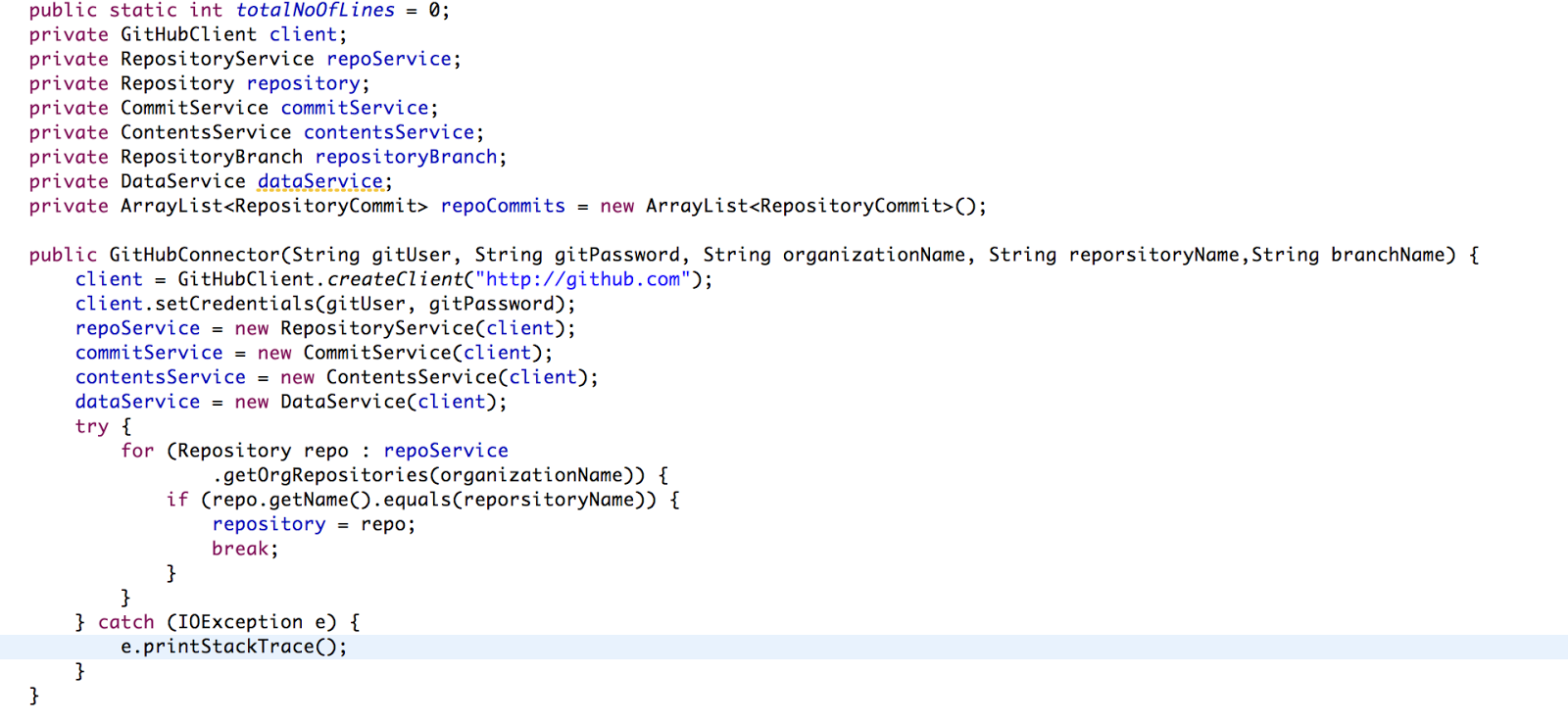
Github Connector is as follows


TestLink Connector is as follows


Above program will also list down stories which needs test cases.


Now you are ready to trace which stories have Test case and which doesn't have. :)

~Yagnanarayana Dande